9to5mac

Your Cart

0 items

Your cart is empty

Add items to get started

9to5mac.keykeeper.app

Premium Mac software at prices you'll love. Curated deals, exclusive deals, instant delivery.

powered byBundleHunt

Explore

  • Best Deals
  • Mac App Store
  • Contact Support

Why Us

Secure Checkout

256-bit SSL

Licensed Software

Official keys

Instant Delivery

Download now

Expert Support

Real humans

© 2026 9to5mac.keykeeper.app
PrivacyTermsContact

Offer Expired

OwlOCR — Deal No Longer Available

This special offer has ended. Get notified when similar deals become available.

★Active Deals You Might Like

View All Deals
SPECIAL OFFER
KeyKeeper - License Manager

KeyKeeper - License Manager

KeyKeeper is the sleek, secure, and user-friendly Software L...

From
$19.99

SPECIAL OFFER
AppVault

AppVault

Draft description

From
$21.99
HOT DEAL • 50% OFF
Accountit

Accountit

Accountit is a simple, but powerful daily transactions track...

From
$9.99$19.99
SAVE $10.00
HOT DEAL • 90% OFF
SwifDoo PDF for MAC

SwifDoo PDF for MAC

Fast and easy to use PDF editor. You can view, edit, convert...

From
$12.90$129.00
SAVE $116.10
SPECIAL OFFER
Mountain Duck 5

Mountain Duck 5

Cyberduck for mounting volumes in the file explorer.

From
$40.00$49.00
SAVE $9.00
Mac App StoreWord Processing
OwlOCR

OwlOCR

byJonLuca
•Version 6.4.2
$8.99$9.9910% OFFDeal Ended

This deal is no longer available.

Browse Active Deals
OwlOCR Screenshot 1
Regular
$9.99
Price
$8.99
10% OFF
by
JonLuca
v
6.4.2
Category
Productivity
OwlOCR

OwlOCR

Version 6.4.2

Word Processing
$8.99$9.9910% OFFEnded

This deal is no longer available.

Browse Active Deals

Developer

JonLuca
  • Share

Grab any text on the screen, convert images or scans to searchable PDFs, open QR-coded URLs,
integrate via CLI, access with Finder Extensions, and more.

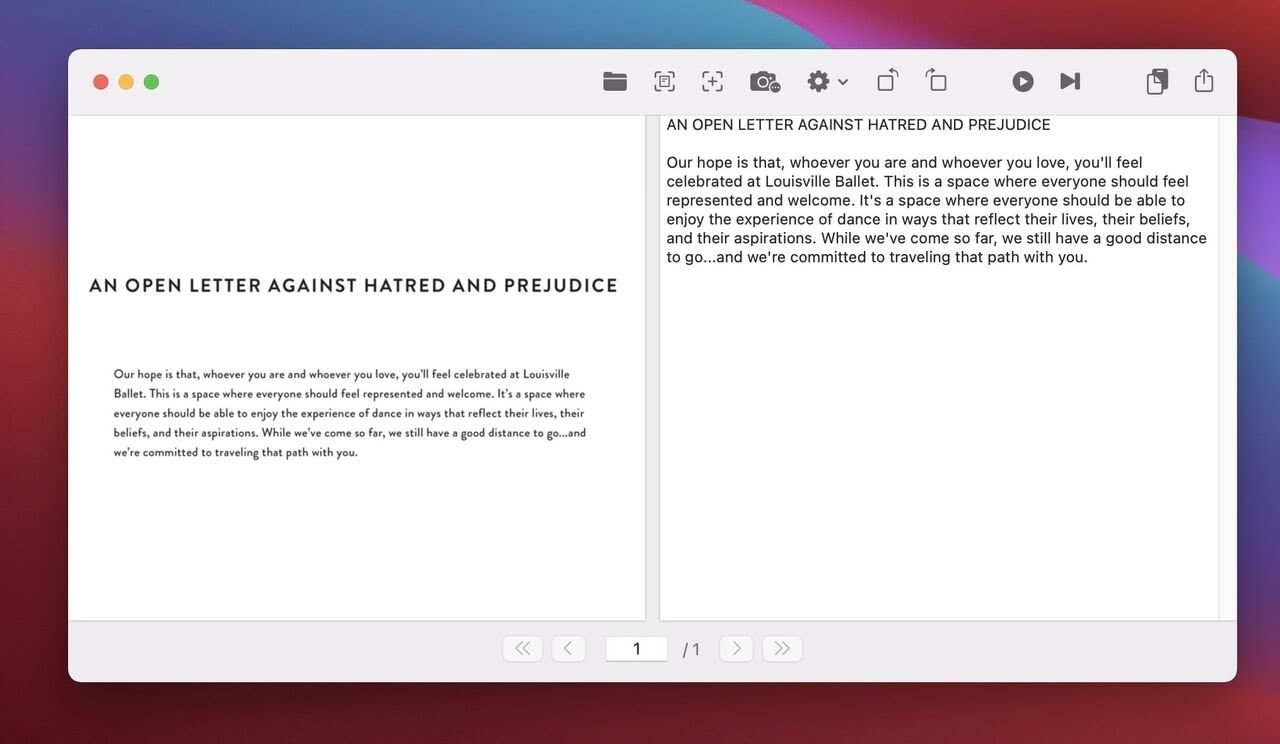
OwlOCR lets you grab a part of the screen and instantly recognize and copy text to the
clipboard. It also recognizes text from PDF files and images, and can convert the contents
to plain text. All processing is done securely on-device—none of your images or files are
sent to third-party cloud services.

The output is plain text you can copy and paste into any app. You can also export a PDF with
the recognized text as an invisible text layer.

Features

  • Grab a screen area for instant OCR and copy results to the clipboard.
  • High-quality text recognition performed securely on-device.
  • Run OCR page-by-page, for a directory, or for a group of files.
  • Scan documents with iPhone or iPad (see requirements: Apple support article).
  • Export searchable PDF files.
  • Create searchable PDFs or extract text via Finder Extensions.
  • Scan barcodes and QR codes and open links automatically (NEW).
  • Integrate with your favorite tools using OwlOCR CLI (NEW).
  • Customize OwlOCR to run as a menu bar or dock app.
  • Wrap text naturally or as in input.
  • Custom dictionary for industry-specific terms.
  • Choose line spacing from 1.0 to 4.0.
  • Option to start automatically on macOS launch.
  • Supported input types: PDF, GIF, PNG, JPEG, JPG.
  • Shortcut Cmd + F1 (configurable) for single area OCR, even in background.
  • Shortcut Cmd + F2 (configurable) for multiple area captures.
  • Requires macOS Catalina or newer.
  • macOS 11 language support: English, French, Italian, German, Spanish, Portuguese, Traditional Chinese, Simplified Chinese.
  • macOS 10.15 language support: English only.
  • Dark Mode supported, plus B&W/Color options for the menu bar icon.
  • Runs natively on Apple Silicon and Intel processors.

Pro Features

  • Batch OCR for multipage PDFs and multiple documents in parallel.
  • Finder Quick Actions on multiple files.
  • Capture up to 20 screenshots with multi-screenshot mode.
  • Run post-process rules automatically.
  • Command-line support for integrations.

Privacy Policy: owlocr.com/privacypolicy
Terms of Use: Apple Standard EULA

What You Can Do

1 use case for OwlOCR

OCR / Extract Text

Frequently Asked Questions

Common questions about this deal

01What's included with OwlOCR on BundleHunt?

OwlOCR on BundleHunt includes a license key and instant download access. The license is obtained directly from the developer and activates the latest version of the software.

02How do I get my OwlOCR license key?

After purchasing OwlOCR through BundleHunt, your license key and download link will be available immediately in your account under "Downloads & Licenses". You can access them anytime.

03What version of OwlOCR will I receive?

You will receive the developer's most up-to-date version of OwlOCR, fully activated and ready for immediate use.