Scherlokk
Scherlokk is a powerful and efficient file search tool for Mac users. It offers an intuitive interface and advanced search capabilities, enabling users to quickly locate files and documents across their systems. Whether searching for documents, images, videos, or any other file type, Scherlokk delivers rapid and accurate results.
Comprehensive File Searching
-
Independent Search Engine: Scherlokk’s independent search engine allows it to find every file on any accessible volume without relying on macOS’s Spotlight index.
-
Search Locations: Built-in drives, external storage devices (USB drives, memory cards, Thunderbolt/FireWire devices), network drives (AFP, SMB, FTP).
Advanced Search Filters
-
File Size: Specify size ranges in B, kB, MB, or GB.
-
Date: Search for files created or modified within specific date ranges.
-
File Type: Filter by music, pictures, bookmarks, documents, or binary files.
-
Content Search: Search within files for specific text, supporting formats like PDF, DOC, DOCX, ODT, XML, RTF, RTFD, EPUB, XLS, XLSX, HTML, and XHTML.
Flexible Result Views
-
Flat View: A straightforward list of matching files.
-
Hierarchical View: Displays files within their folder structures, aiding in understanding file organization.
File Comparison Tool
-
Comparison: Supports both text and binary files, highlights differences such as insertions, deletions, and similar blocks, presented in an easy-to-understand list.
Additional Utilities
-
Hex Editor: A built-in hex editor allows users to view and edit the raw data of files.
-
Multitasking: Open multiple search windows to perform simultaneous searches in different locations.
-
Autosave: Scherlokk remembers user preferences and restores settings upon reopening.
Why Choose Scherlokk Over Spotlight?
-
Real-Time Searching: Scherlokk searches through actual files rather than relying on potentially outdated indexes.
-
Comprehensive Coverage: It can find files that Spotlight may miss, including hidden and system files.
-
Speed: Scherlokk’s search engine is optimized for rapid results, even when handling large volumes of data.
-
Customization: Offers more granular search filters and options compared to Spotlight.
User Interface and Experience
-
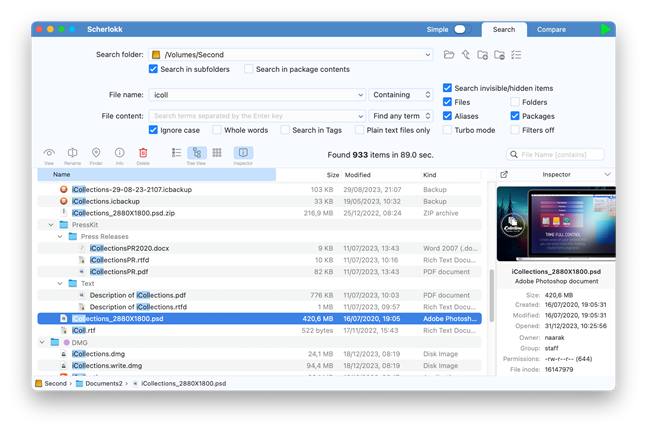
File Description: Specify the name or part of the name of the file you’re searching for.
-
Search Criteria Definition: Set filters like file size, date, and type.
-
Toolbar: Access action buttons for executing searches and managing results.
-
Search Results Table: View and interact with the list of found files.